Showing posts with label driver. Show all posts

Intel 82852 82855 GM GME Windows 7 Driver

Intel 82852/82855 GM/GME Graphics Controller Driver For Windows 7

notes: make sure you follow the instructions carefully:
compile by: Lexxion
edited by: Black x

for expert you can skip certain part, because there are many different level of users, i compose this post in details.

IMPORTANT!
make sure you log in to you pc as administrator/use administrator account

Content:
Part 1: Download and extract driver
Part 2: Uninstall current driver
Part 3: EDIT c:windowssystem32driversvgapnp.sys
Part 4: EDIT c:windowssystem32driversvgapnp.sys part 2
Part 5: Final Step
FIX screen Rotation


PART 1: DOWNLOAD AND EXTRACTING DRIVERS

1. Download the drivers:

Intel(R) Graphics Controller 6.14.10.3722 (Windows)
Download (direct link)
Download (cnet)

(link fixed, but im not hosting this file, so if it got deleted you just google for the file name, i saw many site provide the download links)

Newer version: v6.14.10.4497 - Download
Fix resolution 1200 x 800
Able to run latest Intel Extreme 2 System Tray - as reported by anonymous
.
2. here  files is in zip format, you need to extract it, i suggest for beginner to make your work easier, make a folder in desktop named intel graphic (right click on desktop and select new folder, type Intel Graphic)


3. Paste the driver you download on the Intel Graphic folder you just created, right click on the Intel_6_14_10_3722.zip you extracted and select extract here, it should look like this: (NOTE;: please remember where you extract the driver, you will need it later)
proceed to part 2.


PART 2: UNINSTALL CURRENT DRIVERS

1. If you already installed other driver and failed (if you dont skip part 2), you will find yellow mark on the device manager, right click on it and select uninstall. Your Device Manager should say that you have Standard VGA Driver installed under Display category and exclamation mark on "video controller". Make sure you restart PC when asked.


PART 3: EDIT c:windowssystem32driversvgapnp.sys

1.Click Start and in Search type cmd. The result will show on top. Right-click on cmd and choose "Run as Administrator". If your account does not have admin rights you might be prompted to enter username and password. I used account that already has administrator privileges.


2. The type or copy/paste the following line (pics below): 
              takeown /f c:windowssystem32driversvgapnp.sys


3. Press enter and the result will be success etc, refer to picture above. (the username are differ so your line might differ from the screenshoot)

4. Then type or copy and paste this line:
  cacls c:windowssystem32driversvgapnp.sys /G peter:F

IMPOTANT: at line above you must replace!! peter with your computer name, how to check your computer name, click start and note under the pictures it show your pc name, look at the picture below:


above note my pc name is ajis
so my line will be


  cacls c:windowssystem32driversvgapnp.sys /G ajis:F

, after that type it on your cmd (look at pics below after press enter

 There will be a confirmation message so type y


PART 4: EDIT c:windowssystem32driversvgapnp.sys


1. Open c:windowssystem32driversvgapnp.sys right click and select open or open with.


 2. choose second option on the radio button "select program from a list of installed programs "


3. then select notepad


4. Just add any character to the begining of the text. Lets say we will add character x . So the text should start with xMZ and the rest of stuff. Save the file. This edit will render that file unusable.

example before we add text it should look like this:


after adding text it should look like this


PART5: FINAL STEP

1.First open device manager by click start and  type devmgmt.msc as shown in the pictures below.


2. In Device Manager uninstall Standard VGA Adapter.


3. It will prompt you to restart so do it.

4.After install you will see a message saying that certain devices did NOT installed successfuly, which is GOOD :).

5.Go to Device Manager and you should see the exclamation point next to "video controller" and "video controller (vga compatible)". Right-click on "video controller (vga compatible)" and SELECT update driver.


6.Choose "Browse my computer for the Driver Software" .

7. Then select browse:


 8. Then notice that in part 1 i suggest you extract the driver in new folder (folder name: intel graphic). After click browse point to the folder. expand by click the small arrow button until you find the win2000.


9. Wait for the driver to be installed. It might hang for a little (It will say that window is "not responding"). Do not worry as this is still installing the driver. It will prompt you to restart so do it. (If it does not prompt click anywhere and wait for message). After restart it will finish installing the driver.

10. Open c:windowssystem32driversvgapnp.sys in any text editor. Remove the first character you put there which was x. Save the file. it should look like this before saving it (MZ - ignore other character)


Your file will be usuable again :). You can stop here if you want, but if you want to restore the permissions for the file to original state:

Right-click on any other file in the c:windowssystem32drivers. Choose "Properties". Go to "Security" tab. Now compare that security tab with the security tab of c:windowssystem32driversvgapnp.sys. Just make sure the security tabs of those two files look the same (all tabs and advanced options). In order to add "TrustedInstaller" it is not the same as regular usernames because it is a service.
You will need to type "NT SERVICETrustedInstaller" (without quotes) when adding it to own the file and to have all permissions. Once you done editing you can delete your account from c:windowssystem32driversvgapnp.sys, because it was not there from the beginning. We took control over and the previous commands added it by default.
 

SCREEN ROTATION FIX:
Credit: Mike

1. Open registry editor by click start and tyoe REGEDIT.EXE and press enter.
2. Look for HKEY_LOCAL_MACHINE - - SOFTWARE - - Intel - - CUI
DISPLAY1 - EnableRotation - set value to 1
Read More..

ATI Mobility Radeon 9000 Windows 7 Driver

There is no officiate support for Radeon 9000 for windows 7 from AMD site, and of course it mean they discontinue support for this old card. Most of the advance user prefer using mobility modder which can be found on driverheaven.net, it involve modding which changing several code in the inf IDs section. There is another way to install it and it is easier than modding method.

This tutorial base on Dell Inspiron 600m and Dell Latitude D600 which use ATI Mobility Radeon 9000. This method simply explain how to install windows XP driver in windows 7 using compatibility mode for windows XP SP3.

INSTALLATION STEPS:


1. First you need to download your original windows XP drivers , for this tutorial, dell uses R82040.exe.

ATI Mobility Radeon 9000
Version 8.03_15973C, A05, 22MB
Download


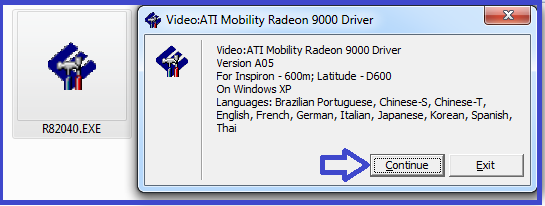
2. After that, double click to extract the file. (You can also extract it using winrar/7z etc.)


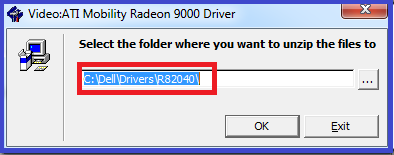
3. By default it will extract to C:delldriversR82040. Click OK and until extraction finish.


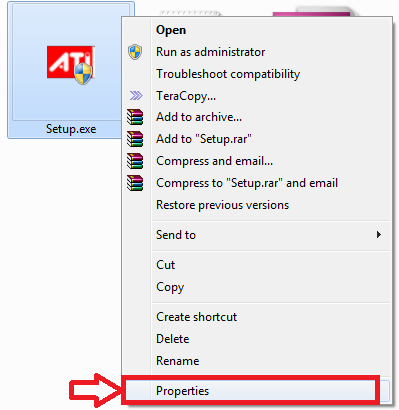
4. Now go to C:delldriversR82040 folder. Right click on setup.exe and select properties.

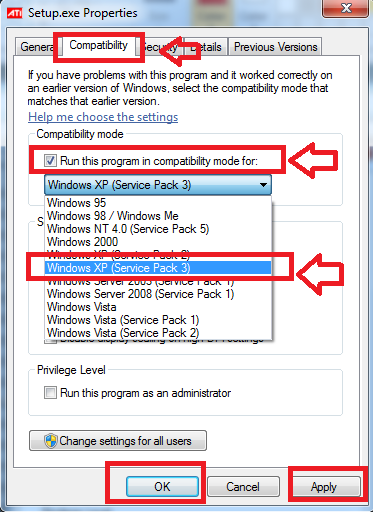
5. Select compatibility tab then, check the box "run this program in compatibility mode for" select windows XP SP3 from the list. Apply and OK.

6. Now install and reboot after installation finish.

Additional Notes :
It is better to right click and select run as admin to install instead of double click the file.
Read More..

HCL Me Laptop 40 Windows Vista Driver

Model: HCL Me Laptop
Series: 40 Series
Compatibility: Windows Vista 32-bit, Windows Vista 64-bit

HCL Me Laptop 40 Driver - Chipset
Windows Vista  Download

HCL Me Laptop 40 Driver - VGA
Windows Vista  Download

HCL Me Laptop 40 Driver - Audio
Windows Vista Download

HCL Me Laptop 40 Driver - MODEM
Windows Vista  Download

HCL Me Laptop 40 Driver - LAN
Windows Vista  Download

HCL Me Laptop 40 Driver - Card Reader
Windows Vista  Download

HCL Me Laptop 40 Driver - Camera
Windows Vista  Download

HCL Me Laptop 40 Driver - Touch Pad
Windows Vista  Download

HCL Me Laptop 40 Driver - Hot Key Driver
Windows Vista  Download

HCL Me Laptop 40 Driver - Hot Key Utility
Windows Vista Download

HCL Me Laptop 40 Driver - Wireless LAN (Atheros)
Windows Vista  Download

HCL Me Laptop 40 Driver - Bluetooth
Windows Vista  Download

HCL Me Laptop 40 Driver - Video View
Windows Vista  Download

HCL Me Laptop 40 Driver - Wireless LAN (Intel)
Windows Vista 32 Bit Download
Windows Vista 64 Bit Download

HCL Me Laptop 40 Driver - BIOS Windows Vista Download
Read More..

Intel 965 Express Chipset Family Windows 8 8 1 Driver

Most of the time, by default windows will load standard and basic VGA Driver for Intel 965 Express Chipset Family. There is no updates for windows 8 for this graphic chip on Intel website but there are updates provide by Microsoft updates. You can download and Install it manually by:

Download the Driver for Windows 8/8.1

1. Go to Microsoft Update catalog using internet explorer browser and type Intel 965 on the search box. You will see 2 files name with:

Intel Corporation driver update for Mobile Intel(R) 965 Express Chipset Family (Microsoft Corporation - WDDM 1.1)

2. There are 2 drivers available for windows 8. Click add and click view basket then click.

click to enlarge

3. Set the location which you wan the files to be stored. I select desktop for this tutorial.

4. Wait until downloads is finish and extract the cab files. (the driver is compress in cab format)
5. You will get 2 driver which is amd64 (for 64-bit) and x86 (32-bit) all in one folder. Extract both (I extract it using winrar). You can also choose one of the driver base on your Operating System.

Install the Drivers

1. Open device manager by press windows button + R and type DEVMGMT.MSC and press enter.
2. Right click on standard VGA under graphic adapter and select update driver.
3. Select browse my computer for Driver Software.
4. Select the driver folder we extracted earlier and continue with on-screen installation until finish. reboot.

Additional Troubleshoot

1. You can also use the same method to install with your original windows 7 drivers.
2. The success depends on the driver version, so it may take a while to test which version will work.
Read More..

How to Disable Driver Signing Enforcement in Windows 8

Windows will prevent users to install drivers without digital signature so to enable drivers without signature installation you need to disable driver signing enforcement.

STEP 1
1. Press Windows key + R, when the "run" box appear type:

shutdown.exe /r /o /f /t 00


STEP 2
2. Before it restart, a start up setting screen will appear. Make the following selection:

Troubleshoot — Advanced options — Start Up Settings — Restart

STEP 3
3. Select " Disable driver signature enforcement" after reboot.
Read More..

DELL Driver

Dell Inspiron 1000 Windows XP |
Dell Inspiron 1018 Windows XP | Windows 7
Dell Inspiron 1150 Windows XP |
Dell Inspiron 1420 Windows XP | Windows 7
Dell Inspiron 1425 Windows XP |
Dell Inspiron 1440 Windows XP |
Dell Inspiron 1501 Windows XP |
Dell Inspiron 1525 Windows XP | Windows 7
Dell Inspiron 1526 Windows XP |
Dell Inspiron 1545 Windows XP |
Dell Inspiron 1721 Windows XP | Windows Vista | Windows 7
Dell Inspiron 6000 Windows XP |

Dell Inspiron 1110 11z Windows 7
Dell Inspiron N3010 (13R) Windows XP |
Dell Inspiron 5323   (13Z) | Windows 7
Dell Inspiron N4010 (14R) | Windows 7
Dell Inspiron N4020 (14V) Windows XP
Dell Inspiron N4030 Windows XP |
Dell Inspiron N5110  | Windows 7
Dell Inspiron M5030 Windows XP | Windows 7
Dell Inspiron M4040 Windows XP | Windows 7

DELL Inspiron 15  | Windows 7 

Dell Latitude D630 Windows XP |
Dell Latitude D280 Windows XP |
Dell Latitude E6410 Windows XP |

Dell Precision M2300  | Windows Vista |

Dell Studio 1735 Windows XP |

Dell Vostro 1000 Windows XP |
Dell Vostro 1015 Windows XP
Dell Vostro 1310 Windows XP
Dell Vostro 1510 Windows XP
Dell Vostro 1220 Windows XP | Windows 7
Dell Vostro 1400 Windows XP
Dell Vostro 3450 Windows XP | Windows 7
Dell Vostro 3500 Windows XP

Dell XPS Studio 1340 Windows XP
Read More..

HP Pavilion DV4000 Driver

Model: HP Pavilion DV4000
Manufacture: Hewlett Packard
Compatibility: Windows XP, Windows 7


HP Pavilion DV4000 Driver Windows XP Driver


Modem
Agere Soft Modem Drivers for ICH6 Chipset
Version1.00 A, 1011.53k Download

Audio
ADI 1981B Audio Driver for Microsoft Windows XP
Version5.12.01.5410 C, 19.0M Download

Graphic
Mobile Intel 915GM/GMS and 910GML Express Chipset Family Video Driver
Version6.14.10.3984 A, 11.26M Download


Mouse and Keyboard
HP Quick Launch Buttons
2008-01-28 , Version6.30 J, 20.39M Download

Touchpad
Touchpad Pointing Device Driver
Version5.4.1501.8 A, 3.42M Download

Wireless:
There are 2 applicable wireless drivers for HP Pavilion DV4000 series, choose base on your specification or try which work for you. Installing wrong wireless driver will not harm your system.

Intel Wireless Driver Version6.00 C, 5.85M: Download
Broadcom Wireless Driver Version6.00 A, 4.12M: Download

LAN-Ethernet
Realtek RTL8100C NIC Driver for Microsoft Windows XP 
Version5.612.0628.2004 A, 2.68M Download

Bluetooth
Support Software for HP Integrated Module with Bluetooth Wireless Technology
Version3.00 B, 30.78M Download

Card Reader
Texas Instruments Media Card Reader Driver
Version 2.0.0.6 A, 6.76M Download


HP Pavilion DV4000 Driver Windows 7 Driver
Since this model built for Windows XP, some of the drivers automatically installed along with windows 7 inastallation and windows automatic updates. If there are drivers missing follow the instruction below to install.

Audio
ADI 1981B Audio Driver for Microsoft Windows XP
Version5.12.01.5410 C, 19.0M Download

(ignore if the installation resulting in error.
  1. Open device manager by click START and type DEVMGMT.MSC in the search box and press enter.
  2. Look for "High Definition Audio...." or similar, it marked with yellow mark. 
  3. Right click on it and select UPDATE DRIVERS.
  4. Select "Browse My computer for Driver Software".
  5. Select "Let me pick from a list of  device driver on my computer".
  6. Click on HAVE DISK and click on Browse.
  7. Point to C:swsetupSP24210 and select the .inf file.
  8. Continue with on screen instruction until installation finish. Ignore if it complaint not digitally sign driver. 
Graphic:
Note: Windows already installed standard VGA driver by deafult. If you are having compatibility issue or performance issue. Follow the instruction below to install your graphic driver.

Intel 910/915 graphic
Download and Installation Instruction 

Wireless, Card Reader:
Use windows Xp driver and install it by using the same method to install audio drivers. 

LAN
Realtek RTL8100 Family PCI-E Fast Ethernet NIC Driver
Version 7.3.522.2009 A, 5MB
Download

Input
HP Quick Launch Buttons
Version:6.50.15.1, 25.42M
Download

Touchpad
Synaptics TouchPad Driver 
Version:13.2.4.12 A, 34.76M
Download
Read More..

ASUS A42JC Windows XP 7 Driver

Chipset
Intel Chipset Installation Utility (HM55 Express)
Windows XP/Vista/7 32/64-bit: Download

Storage:
Intel Rapid Storage Technology
Windows XP/7 32-bit : Download
Windows XP/7 64-bit : Download

MEI
Intel Management Interface Driver
Windows XP/Vista7 32/64-bit : Download

Turbo Boost
Intel Turbo Boost monitor Application.
Windows XP/Vista/7 32/64-bit: Download

Graphic - Nvidia
Nvidia GeForce 310M Graphic Adapter
Windows XP : Download
Windows 7 32-bit : Download
Windows 7 64-bit : Download

Graphic - Intel
Intel Graphic Drivers
Windows XP : Download
Windows 7 32-bit: Download
Windows 7 64-bit: Download

Audio
Realtek ALC269 @ Intel Ibex Peak PCH (SRS Audio)
Windows XP : Download
Windows 7 32/64-bit : Download

Keyboard - ATK
Keyboard Filter Utility
Windows XP : Download
Windows 7 64-bit : Download


Touchpad
Synaptic Touchpad Elantech
Windows XP/Vista/7 : Download

LAN - Ethernet
JMicron JMC251 Ethernet Controller Driver
Windows XP/7 32/64-bit : Download

Bluetooth
Azuware Bluetooth Driver
Windows XP/Vista/7 32/64-bit : Download

Wireless:
Choose one base on your specification:

Intel (R) 6200 Wireless LAN Driver
Windows XP : Download
Windows 7 32/64-bit : Download

Intel (R) 1000 Wireless LAN Driver
Windows XP : Download
Windows 7 64-bit : Download

Azuware Wireless LAN Driver (Atheros)
Windows XP/7 32/64-bit : Download

Webcam
You need o choose base on your specification.  Guide: How to identify your webcam driver.

Bison Camera Driver :PID_01AF
Windows XP/Vista/7 64-bit : Download 

Chicony CNF 9085 Camera Driver : Pid_b1E5
Windows XP/Vista/7 64-bit : Download 

Chicony 9059 Camera Driver
Windows XP/Vista/7 64-bit : Download 

Chicony CNF 7129 CR camera Driver (support most chicony device).
Windows XP/Vista/7 64-bit: Download

Azuware Webcam Driver
Windows XP/Vista/7 64-bit : Download

Suyin Camera Driver
Windows Xp/Vista/7 64-bit : Download
Supported PID:
Pid_a111&MI_00
Pid_f111&MI_00
Pid_f116&MI_00
Pid_a116&MI_00
Pid_f115&MI_00
Pid_a115&MI_00
Pid_a122&MI_00
Pid_a124&MI_00
Pid_a136&MI_00
Read More..

HP 15 Windows 7 and Windows 8 Driver

Model: HP 15 Notebook PC
Manufacture: Hewlett Packard
Compatibility: Windows 7, Windows 8, Windows 8.1 (32-bit and 64-bit)

Note: 
1. Windows 8 below referring to both windows 8 and windows 8.1
2. If you need help to undestand windows 32-bit and 64-bit you can read here.

Recommendation:
1.  Minimum RAM by default (before upgrade) is 6GB and MAX 16GB, so it is strongly recommend to use 64 bit version of windows 7 or windows 8.
2. Run automatic updates if you want to check and obtain latest WDDM/WHQL drivers.
3. Latest updates for the driver also available on the manufacture site:
-Graphic: AMD site
-Touchpad : Synaptic site
-Wireless, LAN, Card Reader: Realtek site

Audio
Realtek High Definition Audio Driver
Version 6.0.1.7004 Rev. A 182MB Windows 7/8 32-bit  
Version 6.0.1.7083 219MB Windows 7/8 64-bit

Graphic
AMD High Definition (HD) Graphic Driver
Version 13.11 Beta  Windows7/8 32-bit
Version 13.152.1.3000 310MB Windows 7/8 64-bit

Touchpad
Alps Touchpad Driver
Version 7.5.1711.125 A Windows 7 32-bit
Version 8.0.1611.102 Windows 8 32/64-bit
Version 8.201.1711.126 50MB Windows 7/8 64-bit

Touchpad
Synaptic Touchpad Driver
Version  13.2.1.0 A 27.63MB Windows 7 32-bit
Version 16.2.10.12 125.7MB windows8 32/64-bit
Version 17.0.15.0 147.96MB Windows 7/8 64-bit

Button
HP Wireless Button Driver
Automatically installed in windows 7 (or install win 8 driver on win 7 system)
Version 1.1.2.1  2.82MB Windows 8 32/64-bit
Having scroll problem in windows 8? Download and Install this driver

LAN -Ethernet
Realtek PCIe FE/GBE Family Controller LAN Driver
Version 7.25.824.2010 5.36MB Windows 7 32/64-bit
Version 8.20.815.2013 7.22MB Windows 8 32/64-bit

Wireless
Mediatek 802.11 Wireless LAN Adapter Driver
Version 5.0.25.0 34.32MB Windows 7/8 32 and 64-bit
Version 5.0.37.0 39MB Windows 8 32/64-bit

Wireless
Realtek RTL8188EE 802.11b/g/n Wireless LAN Driver
Version 2010.1.0506.2013 28MB Windows 7/8 32/64-bit
Version 2012.3.913.2013 21MB  Windows 8 32/64-bit

Bluetooth
Qualcomm Atheros QCA9000 Series Bluetooth 4.0+HS Driver
Version 1.00 381.01MB Windows 7/8 32/64-bit
Version 1.00 6.57MB Windows 8 32/64-bit

Card Reader
Realtek USB 2.0 Card Reader
Version 6.1.7100.30093 A 7.44MB Windows 7 32/64-bit
Version 1.30 11.39MB Windows 8 32/64-bit

Webcam
Cyberlink Youcam Software
Version 5.0.2.3603 145.13MB Windows7/8 32/64-bit

Security
HP Simple Pass Identity Protection Software
Version 8.00.57 90.65MB Windows 7/8 32/64-bit


Driver Information:


1. Graphic driver support 8000 series, AMD Radeon HD 8210
AMD Radeon HD 8330
AMD Radeon HD 8400
AMD Radeon HD 8280

2. Mediatek Driver support following chip:
Mediatek MT7630E 802.11bgn Wi-Fi Adapter
Ralink RT3090 802.11b/g/n WiFi Adapter
Ralink RT3290 802.11b/g/n Wi-Fi Adapter
Ralink RT3592 802.11a/b/g/n WiFi Adapter
Ralink RT5390 802.11b/g/n WiFi Adapter
Ralink RT5390R 802.11b/g/n WiFi Adapter

3. Bluetooth support the following chip:
Qualcomm Atheros AR3012 Bluetooth 4.0 + HS Adapter
Qualcomm Atheros AR9462 Bluetooth 4.0 + HS Adapter
Qualcomm Atheros QCA9565 Bluetooth 4.0 + HS Adapter
Atheros AR3011 Bluetooth 3.0 + HS Adapter

4. Applicable Model:
This drivers is valid for all HP 15 model, for example:
HP 15-d017cl Notebook PC (ENERGY STAR)
HP 15-d038ca Notebook PC (ENERGY STAR)
HP 15-g019wm Notebook PC (ENERGY STAR)
HP 15-g029wm Notebook PC (ENERGY STAR)
Read More..

HCL Me Laptop 40 Windows 7 Driver

Model: HCL Me Laptop
Series: 40 Series
Compatibility: Windows 7 32-bit, Windows 7 64-bit

Drivers - Windows 7 32-bit


HCL Me Laptop 40 Driver - Chipset
Windows 7 32 Bit Download

HCL Me Laptop 40 Driver - VGA
Windows 7 32 Bit Download

HCL Me Laptop 40 Driver - Audio
Windows 7 32 Bit Download

HCL Me Laptop 40 Driver - MODEM
Windows 7 32 Bit Download

HCL Me Laptop 40 Driver - LAN
Windows 7 32 Bit Download

HCL Me Laptop 40 Driver - Card Reader
Windows 7 32 Bit Download

HCL Me Laptop 40 Driver - Camera
Windows 7 32 Bit Download

HCL Me Laptop 40 Driver - Touch Pad
Windows 7 32 Bit Download

HCL Me Laptop 40 Driver - Hot Key Driver
Windows 7 32 Bit Download

HCL Me Laptop 40 Driver - Hot Key Utility
Windows 7 32 Bit Download

HCL Me Laptop 40 Driver - Bluetooth
Windows 7 32 Bit Download

HCL Me Laptop 40 Driver - AHCI
Windows 7 32 Bit Download

HCL Me Laptop 40 Driver - Video View
Windows 7 32 Bit Download

HCL Me Laptop 40 Driver - Wireless LAN (Intel)
Windows 7 32 Bit Download


Drivers - Windows 7 64-bit

HCL Me Laptop 40 Driver - Chipset
Windows 7 64 Bit Download

HCL Me Laptop 40 Driver - VGA
Windows 7 64 Bit Download

HCL Me Laptop 40 Driver - Audio
Windows 7 64 Bit Download

HCL Me Laptop 40 Driver - MODEM
Windows 7 64 Bit Download

HCL Me Laptop 40 Driver - LAN
Windows 7 64 Bit Download

HCL Me Laptop 40 Driver - Card Reader
Windows 7 64 Bit Download

HCL Me Laptop 40 Driver - Camera
Windows 7 64 Bit Download

HCL Me Laptop 40 Driver - Touch Pad
Windows 7 64 Bit Download

HCL Me Laptop 40 Driver - Hot Key Driver
Windows 7 64 Bit Download

HCL Me Laptop 40 Driver - Hot Key Utility
Windows 7 64 Bit Download

HCL Me Laptop 40 Driver - Bluetooth
Windows 7 64 Bit Download

HCL Me Laptop 40 Driver - AHCI
Windows 7 64 Bit Download

HCL Me Laptop 40 Driver - Video View
Windows 7 64 Bit Download

HCL Me Laptop 40 Driver - Wireless LAN (Intel)
Windows 7 64 Bit Download


HCL Me Laptop 40 Driver - BIOS Windows 7 Download 
Read More..

How to Install Old Soundmax Audio Driver in Windows 7

If you have an old laptop and install windows 7 on it, you may notice that your laptop have no audio. Sometimes device manager tells you it is installed and the volume bar work perfectly, but you can still hear no Sound. When you try to download the driver, your manufacture no longer provide updates for Windows 7, what is available only the old driver for Windows XP or Windows Vista.

Before we begin, Soundmax uses AC97 audio which is similar to Realtek AC 97 Audio. Try the AC97 audio first because sometime it did work on some model. Download Link

He is how to use that old Windows Vista or XP for Windows 7.

1. For this example we will install audio on IBM t42. First download your original XP Driver. (for t42 here is the driver: Download )

2.  Extract the driver file using 7zip or Winrar. Remember the path/location where we extract the driver file.

3. Now open device manager by click start and select run, type DEVMGMT.MSC

 
 2. Look at the audio controller and right and select update driver.


 3. Then select browse my computer for the Driver software

4.Click on browse and point to the driver folder we extracted ealier.

It will takes some time to find the driver file and install it. It will prompt i is not compatible but install it anyway.
Read More..

Nec Versa S940 Driver

Card Reader
Texas Instruments PCIxx21 Integrated FlashMedia Controller Driver
Version 2.0.0.0  Download

Chipset
Intel(R) E7220/E7221 Chipset Driver
Version 6.2.0.1005 Download

Infrared
SMSC IrCC NDIS Miniport Infrared Device Driver
Download

Modem 
SoftV92 Data Fax Modem with SmartCP Driver
Download

LAN
Realtek RTK8139/810x Family Fast Ethernet NIC Driver
Download

Audio
Conexant AC-Link Audio Driver
Download

Touchpad
Synaptic Touchpad Driever
Download

Graphic
Intel 82852/82855 GM/GME Graphics Controller Driver
Download

Wireless
Intel Wireless Pro 2200 B/G Driver
Download
Read More..

Acer Aspire 1640 Windows 7 Driver

Model: Acer Aspire 1640/ 1640z
Manufacture: Acer
Compatibility: Windows 7 (windows xp driver click here)

Windows 7 Upgrade Guide for Acer Aspire 1640
This model built for windows XP launched along with 2 other model which are acer aspire 1640z and acer aspire 1650. All windows 7 drivers here is base on the model specification and please let me know if there are any problems installing the drivers.
 Please download and install the drivers you need after upgrade to windows 7. It is not necessary to install all drivers below. To check which driver you need you can read here. How to check your driver in windows 7.

Chipset
Intel Chipset driver 915 and 825/855 chipset
Version 9.2.0.1021 5MB Download

Graphic
Intel 915GM Integrated Graphic Driver.
You need to install this driver manually.
Download and Installation

If your model use ATI Graphic
ATI Mobility Radeon X300
Download and Installation

Wireless 
Atheros AR5001/AR5005G (50XX series)
Version 9.0.0.125  10MB Download

Wireless
Intel Pro 2200BG Wireless Driver
If you are using Intel Pro wireless, you need read the instruction to download and install the driver here: http://laptop-driver.blogspot.com/2010/12/intelr-prowireless-2200bg-windows-7.html

Bluetooth
Widcom Bluetooh Driver
(also known as Broadcom Bluetooth)
Download the latest driver from the widcomm offcial download site here:
http://www.broadcom.com/support/bluetooth/update.php

Audio
Realtek High Definition Audio Driver
Version 6.0.1.5888 68MB Download

Modem:
Conexant HD Audio Modem with Smart CP
For modem you just need to use your original windows xp driver (or windows 7 already install the generic driver for it). Download
To install, Use the same method to install graphic driver.

Lan
Realtek RTL8139/810x Family Fast Ethernet NIC
Version 6.111 (external mirror)
Download

Note: For LAN Driver, In case the link broken, go to www.realtek.com and navigate to:
Downloads - Communications Network ICs - Network Interface Controllers - 10/100M Fast Ethernet - PCI - Software and select windows 7 from the drivers list.

Patch, Update and Installing Latest Driver.

1. Note: Acer only release windows xp drivers for this model so you wont see windows 7 drivers listed on the support page.

2. Audio : Acer didnt provide latest or compatible audio driver for this model on the support site but there are compatible driver on their database. Realtek also continue to provide latest update for this driver which you can download it from the realtek website: www.realtek.com
To download from Realtek site, navigate: Downloads - High Definition Audio Codecs (software) - Accept the terms and agreement - select the version for windows 7.
Read More..

Toshiba Driver

Toshiba Mini NB305 (N310) | Windows 7
Toshiba Portege M500 Windows XP |
Toshiba Satellite A200 Windows XP |
Toshiba Satellite A205 Windows XP |
Toshiba satellite A135-S4517 Windows XP |
Toshiba Satellite L310 Windows XP | Windows 7
Toshiba Satellite L510-P4010  | Windows Vista | Windows 7
Toshiba satellite M505D-S4930 Windows XP |
Toshiba Satellite Pro M300   Windows XP
Satellite M300-(PSMD0A) Windows XP |
Toshiba Satellite Pro S300-EZ1512 Windows XP |
Toshiba Satellite U400-112 | Windows 7
Toshiba Satellite U505-S2970 Windows XP |


Read More..

How to Install Driver Without Internet Connections

Your PC and Notebooks/Laptop needs drivers after windows/OS installation. What we normally do is run automatic updates so windows will download and install  necessary drivers for our system. What if there are no internet connection? Example, you just finish installing windows 7 on your notebook but there are no wireless connection because the wireless drivers not yet installed. There are few ways we can install drivers without internet connection.

1. Use the Installation Disk/CD - (if you still have it)
Usually your computers comes with installation disk/CD/DVD, you may have more than one disk/CD/DVD. One of the disk contains drivers for your computers. What you need to do is insert the disk into CD/DVD-ROM and run the setup to install the drivers. You can identify the Drivers installation disk by looking at the cover written "drivers and utility" or similar.

2. Download from second device and transfer it to your computers.
If you have other device that do have internet connection, you can use it to download the drivers for your computers and transfer it via USB cable/ThumbDrive etc. Example, if you have an iPad, browse the internet and go the manufacture site and then search your model within the manufacture site. Download the drivers and transfer it to your computers.

3. Using Restore/Recovery CD.
Most notebooks manufacture provide recovery CD, insert your recovery CD and follow the on-screen instruction to complete the process.

4. Look for driver backup in your hard-disk (Sometimes Hidden)
This option available if you didnt wipe out your entire disk for windows installation. If you install windows Vista/7/8 over previous installation (install without formatting) or (upgrade), you will have a Windows.Old folder on your c drive. If you open that folder you will see your original files store in that folder. If you are using notebook there are a great chance that your drivers are in the folder. For example Hp product will have Swsetup folder in the windows.old drive, Dell will have dell folder, Toshiba will have "driver" folder, similarly with other laptop. Sometimes, you just did not notice the company already make drivers backup on your other partition (D/E).

5. Final Option - Cybercafe
This will cost you some dollars to go and download your drivers - store it in CD/external storage, but better than repair shop fee.

Best Practice:
Make sure to backup your drivers on Mass storage Device (pendrive/card reader/external hard disk etc) or CD/DVD for future use and never trash any recover/drivers CD provided by the manufacture.
Make sure you have all the drivers needed before installing new Operating System and check whether your manufacture support the Operating System of your choice or not.
Read More..